Difference between revisions of "JoySticks"
Jump to navigation
Jump to search
| Line 1: | Line 1: | ||
| + | {{Infobox tsg | ||
| + | | name = Joystick | ||
| + | | image = RedJoystick.jpg | ||
| + | | caption = The "Red Joystick" | ||
| + | | downloads = {{bulleted list | ||
| + | | [http://www.ru.nl Some Download link] | ||
| + | | [http://www.ru.nl Some other Download link] | ||
| + | }} | ||
| + | }} | ||
| + | |||
| + | |||
| + | There are two types of joystick available for our social sciences researchers: | ||
| + | # [[#Red Joystick|TSG Red Joystick]], a custom built, unimaginatively named, single-axis joystick with a bright red base. | ||
| + | # [[#Logitech Attack 3|Logitech Attack 3]], a commercial multi-axis joystick controller. | ||
| + | |||
== Red Joystick == | == Red Joystick == | ||
| − | [[ | + | === Installation === |
| + | The Red Joystick is a [[wikipedia:plug and play|plug and play]] USB device. | ||
| − | === | + | === Configuration === |
| − | + | When connected to a PC via USB, the Red Joystick will emulate a serial port. The following COM port settings should be used: | |
{| class="wikitable" | {| class="wikitable" | ||
| Line 40: | Line 56: | ||
|} | |} | ||
| − | === Python === | + | ===Usage=== |
| + | |||
| + | ==== Python ==== | ||
<syntaxhighlight lang="python" line> #!/usr/bin/env python | <syntaxhighlight lang="python" line> #!/usr/bin/env python | ||
from rusocsci import joystick, utils | from rusocsci import joystick, utils | ||
| Line 58: | Line 76: | ||
</syntaxhighlight> | </syntaxhighlight> | ||
| − | == Logitech Attack 3 | + | |
| + | == Logitech Attack 3 == | ||
[[File:logitech_joystick.jpg|thumb|200px|Logitech Attack 3 Joystick]] | [[File:logitech_joystick.jpg|thumb|200px|Logitech Attack 3 Joystick]] | ||
Revision as of 15:57, 6 August 2015
 The "Red Joystick" | |
| Downloads | |
|---|---|
There are two types of joystick available for our social sciences researchers:
- TSG Red Joystick, a custom built, unimaginatively named, single-axis joystick with a bright red base.
- Logitech Attack 3, a commercial multi-axis joystick controller.
Red Joystick
Installation
The Red Joystick is a plug and play USB device.
Configuration
When connected to a PC via USB, the Red Joystick will emulate a serial port. The following COM port settings should be used:
| Baudrate | 115200 |
| Parity | None |
| Data bits | 8 |
| Stop bits | 1 |
| Flow control | None |
| CTS Control | Off |
| DSR Out Control | Off |
| DSR In Control | Off |
| RTS Control | Off |
| Set FIFO Interrupt | Off |
Usage
Python
 1 #!/usr/bin/env python
 2 from rusocsci import joystick, utils
 3 import logging, time
 4
 5 ## Setup Section
 6 #logging.getLogger().setLevel(logging.DEBUG) # use this for debug info
 7 #utils.serialList() # get alist of ports with a joystick or buttonbox connected
 8 j = joystick.Joystick()
 9 #j = joystick.Joystick(1) # use this to connect to the second joystick
10 #j = joystick.Joystick(port="COM1") # use this to connect to a joystick on a specific port
11
12 ## Experiment Section
13 for i in range(15):
14 print("x: {}".format(j.getX()))
15 time.sleep(1)
Logitech Attack 3

Installation
The Logitech Attack 3 joystick requires a DirectX 7 DLL file to be installed on your computer. If it hasn't been installed yet, please follow the instructions below.
Windows 7 32bit
- Download dx7vb.dll.
- Extract the zip and copy the .dll file into the following folder: C:\Windows\System32
- Open the Windows Command Prompt with Administrator rights.
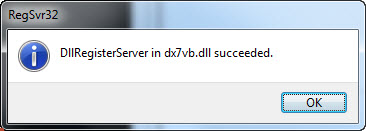
- Register the DLL file by executing the following command:
C:\Windows\System32\regsvr32 dx7vb.dll - When done correctly, you should see the following message:

Windows 7 64bit
- Download dx7vb.dll.
- Extract the zip and copy the .dll file into the following folder: C:\Windows\SysWow64
- Open the Windows Command Prompt with Administrator rights.
- Register the DLL file by executing the following command:
C:\Windows\SysWow64\regsvr32 dx7vb.dll - When done correctly, you should see the following message: